UDisc Disc Golf App
- 4.8
- Rating
- 1.00M
- Installs
- Free
- Price

 Analysis by App-foxy
Disc golf is easy to start, but keeping a round organized becomes surprisingly awkward once several players, unfamiliar courses, and personal statistics enter the picture. I found UDisc most useful because it brings those jobs together without making the scorekeeping part feel like paperwork. It is a sports app from UDisc LLC, available free of charge for everyone, and its core appeal is practical: I can locate a course, record a round, review how I played, and use the same app again the next time I go out.
UDisc is at its best when it becomes part of a repeatable disc golf routine, rather than something I open only when I need a map. The app has earned a 4.8 average from around 60 thousand ratings, with more than a million installs, which matches my impression that it is aimed at regular players as much as curious beginners. It is not a replacement for learning throwing technique or reading a course properly, but it removes a lot of small distractions between arriving at the first tee and finishing the last hole.
How the everyday round comes together
I find the round gets easier when I treat the phone as a quiet scorekeeper, not the group’s main activity. Before the first tee, I settle who will enter scores and agree that everyone calls out results in the same order; that small routine prevents both delays and later guesswork. With the social rhythm sorted, the next useful step is checking that the course and round are set up for the outing we actually planned.
You May Also Like

 Blood Strike: 2.5 Anniversary
Blood Strike’s Loadouts Turn Every Drop Into a Tactical Gamble
A close look at Blood Strike’s custom loadouts: how fast access to signature weapons reshapes its battle royale rhythm, rewards preparation, and narrows the gap between fights.

 Pandora - Music & Podcasts
Pandora’s Music Is Easy to Start, but Harder to Recover
Pandora’s strength is its low-effort path from a seed to a station. Its weak spot is how much confidence it asks you to place in connection, setup, and quiet recovery.

 8 Ball Pool
 Is Built on Rivalries, Rematches, and Routine
A close look at the rivalries, rematches, shared routines, and unanswered safety questions that turn a quick pool match into a persistent mobile community.

 Samsung Music
’s Quiet Strength Is Playing What You Already Own
Its reach comes less from spectacle than from dependable access to a personal library. That simplicity is both the app’s strongest retention engine and its ceiling.

 AccuWeather: Weather Radar
AccuWeather Review: A Quick, Clear Forecast for Everyday Decisions
For everyday plans, the best forecast is the one you can understand quickly. AccuWeather makes rain timing, radar, and local conditions easy to act on, with a few trade-offs.

 Hill Climb Racing
Why Hill Climb Racing Still Turns Crashes Into One More Run
A tiny car, a bumpy hill and one more upgrade: Hill Climb Racing keeps resurfacing because its simple chaos makes every near-miss feel personal.
More From Our News Desk



Starting with the course instead of a blank scorecard
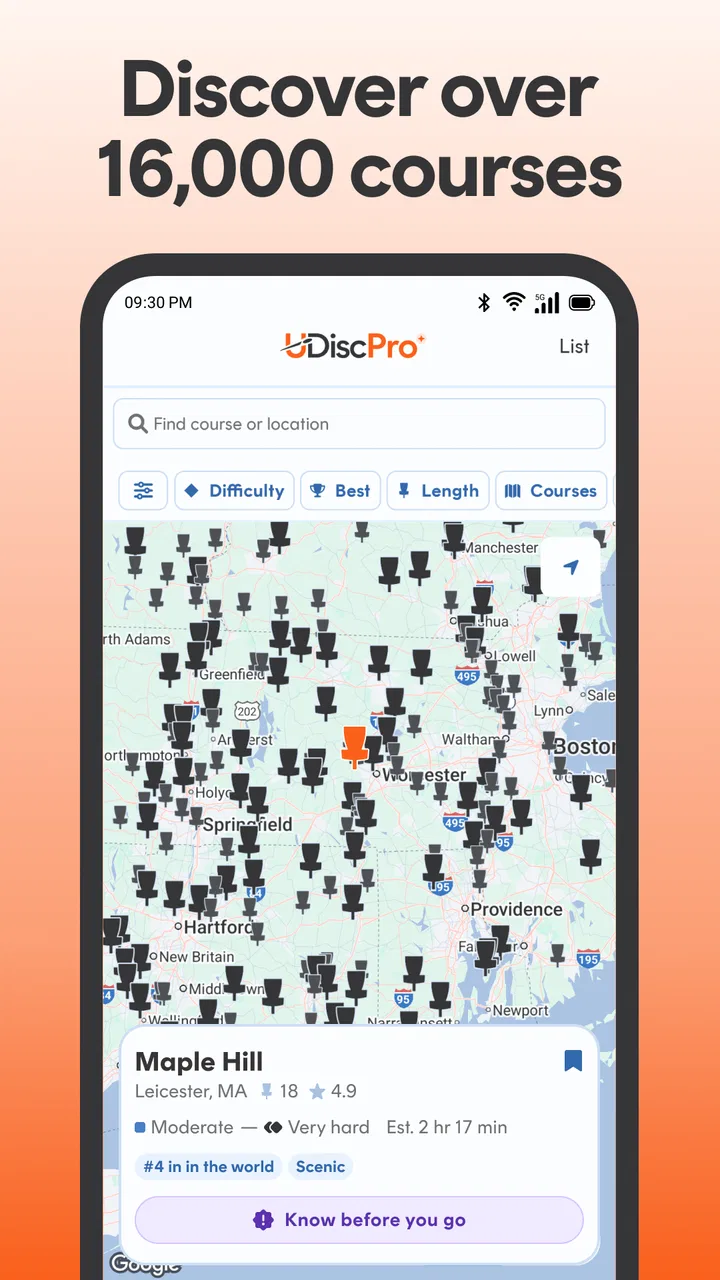
The most natural starting point is course discovery. Rather than relying on a general map app and then searching separately for a scorecard, I use UDisc to identify the course and get the round moving from the same place. That matters when I am visiting a new area, because the useful question is not merely “where is the park?” but “which disc golf course is here, and what will I need once I arrive?”
For a casual outing, I can keep the preparation simple: find the course, check that I have selected the right layout, and create the round with the people who are actually playing. That last check is worth making before the first throw. A course may have more than one layout or a familiar name shared by another location, and choosing carefully at the beginning prevents a messy correction after several holes.
During play, the scorekeeping screen is more useful than a paper card when the group wants a clean record afterward. I can enter each player’s result as we go, which keeps the score visible and reduces the familiar end-of-hole arguments about who took what. I still prefer one person to take responsibility for entering the scores, rather than passing the phone around constantly. That habit is faster and also makes accidental edits less likely.
There is a small social advantage here. If a friend is new to disc golf, they do not need to understand every scoring detail before joining the round. I can handle the card while they concentrate on throwing, and the app gives the group a shared reference point. For experienced players, the same workflow is useful because it keeps conversation and pace ahead of administration.
A realistic Saturday use case
Imagine meeting two friends at a course we have not played before. Before leaving, I use the course search to confirm the destination and look over the available information. At the parking area, I create the round, add the players, and decide who will carry the scoring responsibility. After each hole, we call out the results while they are fresh. At the end, I save the round and later look back at the holes that affected the result.
That routine sounds ordinary, but it solves several common problems at once. Nobody has to photograph a paper card, nobody has to reconstruct scores from memory, and the round is connected to the course rather than floating as an isolated note. If we return weeks later, the previous round gives us something meaningful to compare against, even if our goal is simply to enjoy the course.
The important point is not to overmanage a relaxed game. UDisc can support a serious scorekeeping habit, but I would not let the phone become the center of the round. I enter scores quickly, put it away, and focus on the next shot. The app works best as a quiet assistant.
Using statistics without turning every round into homework
Stat tracking is where the app becomes more valuable over time. A single score tells me how I finished; a collection of rounds can show patterns. I may notice that my total score is improving while certain holes continue to cost me strokes, or that a course feels difficult for reasons that are not obvious from the final number.
I recommend starting with one question rather than trying to analyze everything. For example, I might review whether my performance on a particular course is becoming more consistent. Another useful habit is checking the round soon after playing, while I still remember why a hole went badly. A poor result may have come from a risky line, a missed short putt, or a difficult lie, and that context is more useful than the number alone.
There is also a difference between tracking information and acting on it. UDisc can help me see a pattern, but it cannot decide whether I should change a disc, alter my run-up, or choose a safer route. I treat the statistics as prompts for better practice decisions, not as an automatic coaching system.
Checking settings before the app becomes familiar
The first settings worth checking are the ones that affect how quickly I can record a hole. I want the scoring flow to match the way my group plays. If I am the only person entering results, I favor a layout that lets me move from one player to the next with minimal tapping. If the group prefers to review each score together, I slow down slightly and verify the entries before moving on.
I also pay attention to the course and layout selected for the round. This is not a glamorous setting, but it is one of the most important. A score recorded against the wrong layout becomes less useful later, especially when I am comparing rounds or trying to understand progress. My habit is to pause at the start and confirm the course name and layout before the first throw.
Location-related tools deserve practical judgment as well. When I am exploring courses, I use the phone’s location capabilities when they make finding the starting area easier, but I do not assume that every course will be equally clear or equally convenient to navigate. Trees, poor reception, crowded parks, and changing conditions can all make a digital reference less decisive than a quick look around the tee area.
Another useful adjustment is deciding when to use the app and when to rely on a physical backup. On a short local round, I am comfortable using only my phone. For a long day, a remote course, or a group where the device battery is already low, I prefer to begin with enough charge and keep a simple backup plan. Digital convenience should not become a reason to interrupt the round.
Shortcuts that make repeated rounds smoother
Experienced use is less about secret functions and more about reducing repeated decisions. I keep a consistent order for starting rounds: identify the course, verify the layout, add the players, and check the scoring setup. Because I repeat those steps, I spend less time searching through the interface and more time preparing for the first hole.
I also avoid entering information in large batches. Waiting until several holes are complete may seem faster, but it increases memory errors and makes it harder to resolve a disputed score. Entering results immediately after each hole is usually the better trade-off. It takes a few seconds, yet it protects the accuracy of the whole round.
For groups, one scorer is usually more efficient than shared phone duty. I make that role clear before we start, and I ask players to announce scores in the same order each time. This is a simple human shortcut rather than an app feature, but it has a noticeable effect on pace. The phone remains with one person, and everyone knows when the score is final.
When I want meaningful statistics, I am careful about consistency. I try to record complete rounds in the same way rather than mixing casual practice holes with serious rounds and then drawing strong conclusions from the totals. If I am testing a new throwing style or playing in unusual conditions, I remember that the result may describe that experiment, not my normal level.
The throw-measuring tools are most useful when I treat them as reference points. I would not use one measurement to declare that a disc is permanently suited or unsuited to me. Wind, release angle, ground action, and the quality of the throw all matter. Repeating the same kind of test in similar conditions gives the information more value than chasing one impressive result.
Where the experience becomes more advanced
Players who want more than basic scorekeeping can use course history and performance records to build a personal feedback loop. Before returning to a familiar course, I can look back at previous rounds and identify holes that deserve a more conservative plan. After playing, I can compare the outcome with that plan and decide whether the problem was execution or strategy.
This is one of the strongest reasons to keep using the app. A scorecard is temporary; a personal record can influence future decisions. If I repeatedly lose strokes on a hole because I attack a narrow gap too aggressively, the useful lesson may be to choose a safer placement shot. The app does not make that decision for me, but it makes the repeated pattern easier to notice.
Course discovery also supports planning beyond the local park. When I have limited time, I can search for a course before setting out instead of arriving somewhere and hoping the facilities suit the group. A beginner-friendly outing, a quick practice session, and a full day of competitive play may all call for different course choices. Having the course information and scoring workflow in one sports app makes that planning less fragmented.
There is a trade-off, however. The deeper the record becomes, the more useful accurate input is. If I frequently skip holes, select the wrong layout, or enter scores later from memory, the resulting history can look precise while being unreliable. The app rewards disciplined habits. It is not magic storage that turns inconsistent information into perfect analysis.
What the app does not replace
I would not choose UDisc as my only guide if I expect every course detail to remove the need for local awareness. Disc golf courses can change, baskets can be moved, and park conditions can affect play. The app is a strong planning and recording tool, but I still look at tee signs, respect park rules, and ask another player when something on the ground does not match what I expected.
It is also not the right choice for someone who dislikes using a phone during outdoor activities. A paper scorecard is quicker to hand to another player, works without a battery, and has no learning curve. For a very casual round where nobody cares about course history or statistics, that simplicity may be preferable.
Players who want detailed technique instruction should set their expectations correctly too. UDisc can organize information about rounds, throws, and courses, but improvement still comes from practice, observation, and feedback. I use the app to identify what deserves attention; I do not expect it to diagnose my form.
The free price makes trying it easy, but some users may encounter in-app purchases priced at $29.99 per item. That means I would begin with the free experience and decide whether the additional value fits my habits before paying for anything. A player who only needs occasional course discovery and basic scorekeeping may have no reason to expand beyond that starting point, while a committed player may find deeper use worthwhile.
Compatibility, maturity, and who should install it
The app has been available since March 11, 2012, and that long presence shows in its focus. It feels built around the recurring needs of disc golfers rather than around a generic sports log. It supports Android devices running version 9 or later, so anyone using an older phone should check compatibility before planning around it.
For a beginner, I would recommend it when the person expects to play more than once. The course finder can make the first outings less intimidating, while the scorecard keeps the group organized. For a regular player, the stronger reason is continuity: courses, rounds, and personal observations become more useful when they accumulate in one place.
I would be more cautious recommending it to someone who plays only once, refuses account-based digital routines in general, or wants a purely offline experience with no phone involved. In those cases, the conventional scorecard may be more comfortable. The right choice depends less on skill level than on whether the player wants a record that remains useful after the round ends.
My verdict after building a repeatable habit
After using it as a course finder, scorecard, statistics log, and throw reference, I see UDisc as a practical companion for people who want their disc golf sessions to connect. Its real strength is not one flashy tool. It is the way small tasks fit together: find the course, set up the round, record results promptly, review the outcome, and use that knowledge on the next visit.
My advice is to keep the workflow light. Confirm the course and layout, choose one scorer, enter every hole while it is fresh, and review only the patterns that can change your next round. That approach avoids the common mistake of collecting numbers without learning from them. It also keeps the app in its proper role: useful support, not a distraction from playing.
For regular disc golfers, UDisc is easy to recommend because it turns repeated outings into an organized personal history. Beginners can start with the simple scorekeeping and course search, while experienced players can build more deliberate habits around layouts, statistics, and throw measurements. Its limits are real, especially for people who prefer paper or expect automated coaching, but within its sports category it offers a focused and mature way to plan rounds and understand how they develop.
In my experience, the best reason to install UDisc is not to make one round more complicated. It is to make the next ten rounds easier to plan, easier to record, and easier to learn from.
FAQs for UDisc Disc Golf App
01What features does the UDisc Disc Golf App offer?
The UDisc Disc Golf App provides a wide array of features, including real-time scorekeeping, course maps, and player statistics. It also offers a course directory with over 10,000 courses, GPS mapping, and the ability to track your round history. Additionally, you can explore leaderboards and connect with other disc golf enthusiasts.
02Is UDisc available for both Android and iOS?
Yes, UDisc is available for download on both Android and iOS platforms. The app is designed to provide a seamless experience on both operating systems, ensuring that all users can access its comprehensive features, regardless of their device preference. Check the Google Play Store or Apple App Store for the latest version.
03Does UDisc require a subscription for premium features?
While UDisc offers a free version with essential features, accessing premium features requires a subscription. The premium version includes advanced score tracking, offline course maps, and detailed statistics. Subscriptions can be purchased monthly or annually, providing flexibility to choose what suits your usage best.
04How accurate is the GPS mapping in UDisc?
UDisc utilizes advanced GPS technology to provide highly accurate mapping of disc golf courses. The app allows players to view course layouts and distances with precision. However, GPS accuracy can vary based on your device and location, so it's recommended to check your settings for optimal performance.
05Can I use UDisc offline?
Yes, UDisc allows for offline use, particularly with its premium subscription. Offline features include downloading course maps and saving scorecards without an internet connection. This is particularly useful when playing in areas with limited or no connectivity, ensuring your game data is captured accurately.
Pros
- Easy-to-use interface for beginners.
- Comprehensive course directory available.
- Accurate GPS for course mapping.
- Live score tracking with friends.
- Regular updates and improvements.
Cons
- Limited offline functionality.
- Some features require a subscription.
- Occasional GPS inaccuracies.
- User interface can be overwhelming.
- Battery drain during extended use.

UDisc Disc Golf App
Gallery